Modern applications rarely consist of a single API call. They involve authentication, retries, logging, error handling, and monitoring—repeated across every request.
This is where interceptors become indispensable.
Although each platform implements interceptors differently, the core idea is universal:
Intercept execution at a central point to apply cross-cutting logic consistently.
This article walks through how interceptors work across Android, React, iOS, and .NET, mapping the same concept to each ecosystem.
What Is an Interceptor?
An interceptor sits between your application code and the network layer. It allows you to:
- Modify requests before they are sent
- Inspect or transform responses
- Handle errors globally
- Implement authentication and retries
- Keep business logic clean and focused
Think of it as a checkpoint that every request and response must pass through.
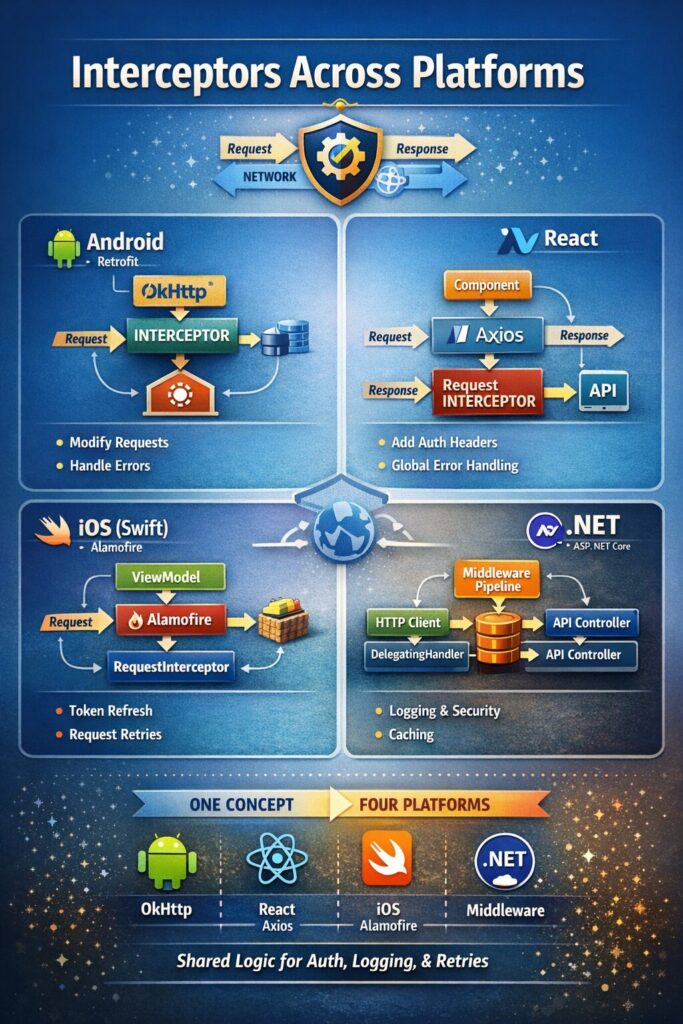
Android: Interceptors with Retrofit (OkHttp)
On Android, interceptors are implemented using Retrofit, powered internally by OkHttp.
Retrofit itself does not define interceptors; OkHttp does.
Common Use Case: Authentication Header
class AuthInterceptor : Interceptor {
    override fun intercept(chain: Interceptor.Chain): Response {
        val request = chain.request()
            .newBuilder()
            .addHeader("Authorization", "Bearer TOKEN")
            .build()
        return chain.proceed(request)
    }
}
Attached to Retrofit via OkHttpClient, this interceptor ensures every API call carries the required token.
Why It Matters on Android
- Eliminates duplicate header logic
- Centralizes error handling
- Keeps ViewModels and Repositories clean
React: Interceptors with Axios
React has no native interceptor mechanism. Instead, interceptors are provided by Axios, the most common HTTP client used in React applications.
Request Interceptor Example
axios.interceptors.request.use((config) => {
  const token = localStorage.getItem("token");
  if (token) {
    config.headers.Authorization = `Bearer ${token}`;
  }
  return config;
});
Response Interceptor Example
axios.interceptors.response.use(
  response => response,
  error => {
    if (error.response?.status === 401) {
      window.location.href = "/login";
    }
    return Promise.reject(error);
  }
);
Why It Matters in React
- Keeps components focused on UI
- Avoids repetitive try/catch blocks
- Enables global auth and error policies
iOS (Swift): Interceptors with Alamofire
In native Swift, request interception can be implemented using URLProtocol, but in production apps, Alamofire provides a clean, first-class interceptor abstraction.
Alamofire RequestInterceptor Example
class AuthInterceptor: RequestInterceptor {

    func adapt(_ urlRequest: URLRequest,
               for session: Session,
               completion: @escaping (Result<URLRequest, Error>) -> Void) {
        var request = urlRequest
        request.setValue("Bearer TOKEN", forHTTPHeaderField: "Authorization")
        completion(.success(request))
    }

    func retry(_ request: Request,
               for session: Session,
               dueTo error: Error,
               completion: @escaping (RetryResult) -> Void) {
        if request.response?.statusCode == 401 {
            completion(.retry)
        } else {
            completion(.doNotRetry)
        }
    }
}
Why It Matters on iOS
- Clean separation of networking concerns
- Built-in retry logic
- Production-grade interceptor support
.NET: Interceptors with HttpClient and Middleware
.NET offers multiple interception layers depending on direction and scope.
Outgoing HTTP: DelegatingHandler
The equivalent of a Retrofit/Axios interceptor is HttpClient with a DelegatingHandler.
public class AuthHandler : DelegatingHandler
{
    protected override async Task<HttpResponseMessage> SendAsync(
        HttpRequestMessage request, CancellationToken cancellationToken)
    {
        request.Headers.Authorization =
            new AuthenticationHeaderValue("Bearer", "TOKEN");

        return await base.SendAsync(request, cancellationToken);
    }
}
Registered via dependency injection, this handler intercepts every outgoing HTTP call.
Incoming HTTP: Middleware
On the server side, ASP.NET Core middleware intercepts incoming requests and outgoing responses, making it ideal for logging, security, and validation.
One Concept, Different Names
| Platform | Interceptor Mechanism |
|---|---|
| Android | OkHttp Interceptor |
| React | Axios Interceptor |
| iOS | Alamofire RequestInterceptor |
| .NET | DelegatingHandler / Middleware |
Despite differences in APIs and syntax, the intent is identical.
Why Interceptors Are a Best Practice
Across all platforms, interceptors provide:
- Separation of concerns
- Consistency across requests
- Reduced duplication
- Improved maintainability
- Cleaner business logic
They are a hallmark of well-architected applications.
Final Thoughts
Interceptors are not a feature tied to a specific framework—they are an architectural pattern.
Once you understand them on one platform, you will recognize and apply them naturally across others.
If you are building scalable, maintainable applications, interceptors should not be optional—they should be foundational.