Running and connecting Model Context Protocol (MCP) servers has long been a fragmented process. Each server traditionally existed in its own repository with unique setup requirements. This made it difficult for developers to harness MCP’s full potential without hours of configuration.
With the new Docker MCP Catalog, that complexity is now reduced to a single click. The catalog brings together pre-built MCP servers — packaged as secure, isolated containers — that can be instantly installed, connected, and orchestrated.
What is Docker’s MCP Catalog?
The Docker MCP Catalog is a centralized directory within Docker Desktop that lists all available MCP servers. Instead of hunting through GitHub repos and writing custom JSON configurations, developers can now:
- Browse a curated list of MCP servers sorted by popularity.
- Install each in one click.
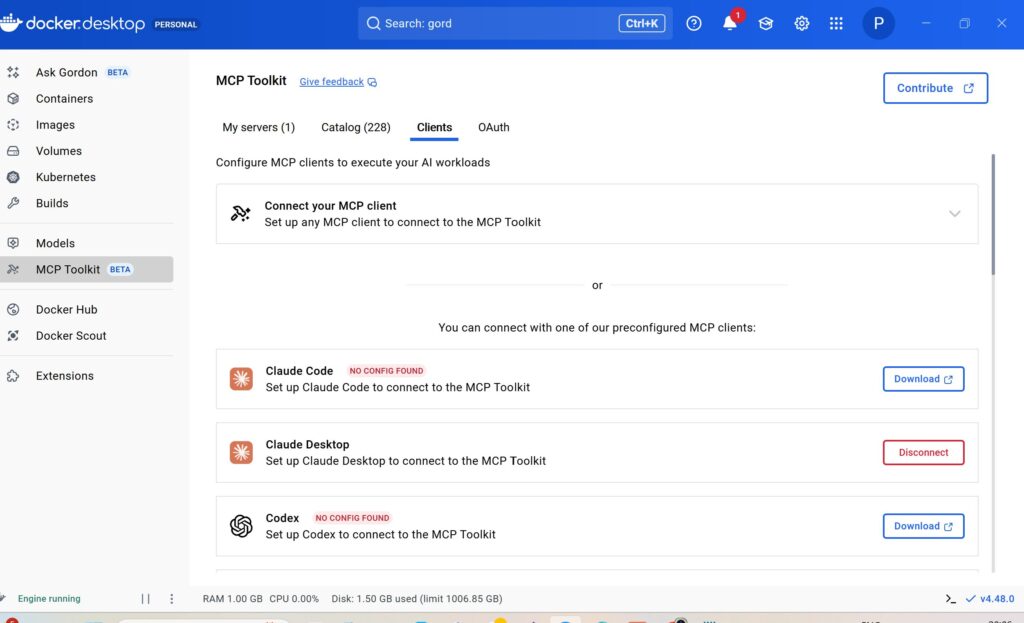
- Automatically connect them to supported clients such as Claude Desktop, Claude Code, Gemini CLI, and even custom agents.
Docker Desktop handles all of the container orchestration behind the scenes — launching a lightweight container when a server is called and shutting it down immediately after execution.
Quick Setup
- Install Docker Desktop (latest version).
- Enable Beta Features for full MCP Toolkit support.
- Open the MCP Catalog under AI > MCP Toolkit.
- Choose a server (e.g. YouTube Transcript, Slack, Notion, or GitHub) and click Add MCP Server.
- Optionally configure API keys within the interface.
Within seconds, the server is added and ready for testing with Docker’s internal agent, Gordon, or with external clients.
Testing with Docker’s Built-in Agent (Gordon)
Docker Desktop now includes Gordon, a lightweight AI agent that comes preconnected to the MCP toolkit.
To test, users can run simple tasks such as summarizing a YouTube video using the YouTube Transcript MCP. When executed, Docker briefly spins up a container for that MCP, performs the task, and automatically shuts it down — ensuring efficiency and security.
Expanding to Third-Party Clients
After validation through Gordon, MCP servers can be instantly linked to Claude Desktop, Claude Code, or Gemini CLI. When connected, they appear as a single unified MCP server (mcp_docker), aggregating all available tools from every active server within the catalog.
This uniform containerized integration allows developers to chain workflows across multiple platforms — such as using Slack data, GitHub actions, and Obsidian notes in one continuous agent-driven process.
Building an Agentic Workflow
Cole Medin demonstrated an end-to-end autonomous pipeline using MCP servers from the Docker catalog:
- Pull a YouTube transcript.
- Summarize it into Obsidian notes.
- Read research content from Slack.
- Create an issue in GitHub.
- Trigger Claude Code to autonomously start work on that issue.
All of this ran seamlessly through Claude Desktop — powered entirely by four Docker MCP servers communicating under a unified context.
Behind-the-Scenes Efficiency
Each MCP tool runs inside an ephemeral container. When triggered, Docker:
- Spins up the container for the selected MCP tool.
- Executes the isolated operation.
- Shuts it down immediately when finished.
This design maintains minimal memory usage and guarantees sandboxed operation — ideal for multi-agent and corporate environments.
Using Docker MCP Gateway for Custom Agents
For developers building their own AI agents, Docker introduced the open-source MCP Gateway (available at github.com/docker/mcp-gateway).
This gateway acts as a relay that connects local MCP servers to any external or proprietary agent, enabling the same catalog-based access outside Docker Desktop.
Cole’s demo showed integration with n8n and LiveKit agents using the command:
textdocker run -p 8089:8089 docker/mcp-gateway \
  --transport http-streamable
Once running, custom agents simply target the MCP endpoint via HTTP and leverage all catalog-installed servers instantly.
Real-World Applications
- Developers can unite tools like GitHub, Slack, and Notion into a single contextual workflow.
- Organizations can manage production-grade MCP deployments with container-level isolation.
- Data engineers can rapidly prototype RAG (Retrieval-Augmented Generation) pipelines using servers like Context7 or Firecrawl.
Why It Matters
The Docker MCP Catalog represents the next leap in AI agent modularity and deployment.
By leveraging Docker’s strengths in isolation, reproducibility, and portability, it transforms MCP setup from a developer headache into a plug-and-play experience.
Whether you’re using Claude Desktop for brainstorming, Claude Code for automation, or custom-built agents, Docker just made your agentic ecosystem radically simpler.