Introduction: Why AI Web Scraping Is the Future
Web scraping has become a critical skill in data science, machine learning, SEO analysis, and business intelligence. However, modern websites rely heavily on JavaScript-rendered content, making traditional scraping tools like requests ineffective.
At the same time, raw scraped data is no longer enough. Organizations now require AI-driven analysis, such as summarization, classification, and insight extraction.
In this article, we will build a modern AI web scraping system using Python that combines:
- Playwright for scraping JavaScript-heavy websites
- BeautifulSoup for HTML parsing
- Offline Hugging Face LLMs for free AI processing
- Async Python (asyncio) for performance
This solution is cost-free, offline-capable, and production-structured, making it ideal for students, developers, and AI engineers.
High-Level Architecture of the AI Web Scraper
AI Web Scraping Pipeline
Website → Playwright Browser → HTML Content
        → BeautifulSoup Parser → Clean Text
        → Offline LLM → AI Summary / Insights
Project Structure (Best Practice)
WebScrapingAiAgent/
├── scraper.py              # Main runner
├── web_scraper_agent.py    # Playwright-based scraper
├── local_llm.py            # Offline AI model logic
├── requirements.txt
└── venv/
This separation of concerns ensures maintainability, scalability, and professional code quality.
Why Use Playwright for Web Scraping?
Limitations of Traditional Web Scraping
Most websites today:
- Load content dynamically
- Use React, Angular, or Vue
- Block non-browser requests
Benefits of Playwright
Playwright is a browser automation framework that:
- Executes JavaScript like a real user
- Handles lazy loading and SPA websites
- Supports async execution
- Works reliably with modern websites
This makes Playwright the best Python web scraping tool for dynamic websites.
Implementing the Web Scraper in Python
Web Scraper Class Using Playwright
from playwright.async_api import async_playwright

class WebScraperAgent:
    def __init__(self, headless=True):
        self.headless = headless
        self.playwright = None
        self.browser = None
        self.page = None

    async def init_browser(self):
        self.playwright = await async_playwright().start()
        self.browser = await self.playwright.chromium.launch(
            headless=self.headless
        )
        self.page = await self.browser.new_page()

    async def scrape_content(self, url):
        if not self.page or self.page.is_closed():
            await self.init_browser()
        await self.page.goto(url, wait_until="networkidle", timeout=30000)
        return await self.page.content()

    async def close(self):
        if self.browser:
            await self.browser.close()
        if self.playwright:
            await self.playwright.stop()
Extracting Clean Text with BeautifulSoup
Once HTML is retrieved, we must extract human-readable text.
from bs4 import BeautifulSoup

def extract_text(html):
    soup = BeautifulSoup(html, "html.parser")
    return soup.get_text(separator=" ", strip=True)
This step prepares data for AI processing, SEO analysis, or NLP pipelines.
Using a Free Offline LLM for AI Processing
Why Offline LLMs?
Paid APIs (OpenAI, Gemini) are powerful but:
- Cost money
- Require API keys
- Depend on internet availability
Offline Hugging Face models offer:
- Free usage
- Local execution
- No rate limits
We use GPT-Neo (125M) for lightweight summarization.
Offline LLM Implementation (Hugging Face)
local_llm.py
from transformers import AutoTokenizer, AutoModelForCausalLM

MODEL_NAME = "EleutherAI/gpt-neo-125M"

tokenizer = AutoTokenizer.from_pretrained(MODEL_NAME)
model = AutoModelForCausalLM.from_pretrained(MODEL_NAME)

def summarize_text(text, max_new_tokens=150):
    prompt = f"Summarize the following content:\n{text}\nSummary:"

    inputs = tokenizer(
        prompt,
        return_tensors="pt",
        truncation=True,
        max_length=1024
    )

    outputs = model.generate(
        **inputs,
        max_new_tokens=max_new_tokens,
        temperature=0.7,
        do_sample=True,
        pad_token_id=tokenizer.eos_token_id
    )

    return tokenizer.decode(outputs[0], skip_special_tokens=True)
Main Execution Script (scraper.py)
import asyncio
from web_scraper_agent import WebScraperAgent
from local_llm import summarize_text
from bs4 import BeautifulSoup

async def main():
    agent = WebScraperAgent(headless=True)

    html = await agent.scrape_content(
        "https://www.deeplearning.ai/courses"
    )

    soup = BeautifulSoup(html, "html.parser")
    text = soup.get_text(separator=" ", strip=True)[:3000]

    summary = summarize_text(text)

    print("\n===== AI SUMMARY =====\n")
    print(summary)

    await agent.close()

asyncio.run(main())
This script connects scraping + AI + async execution into a single workflow.
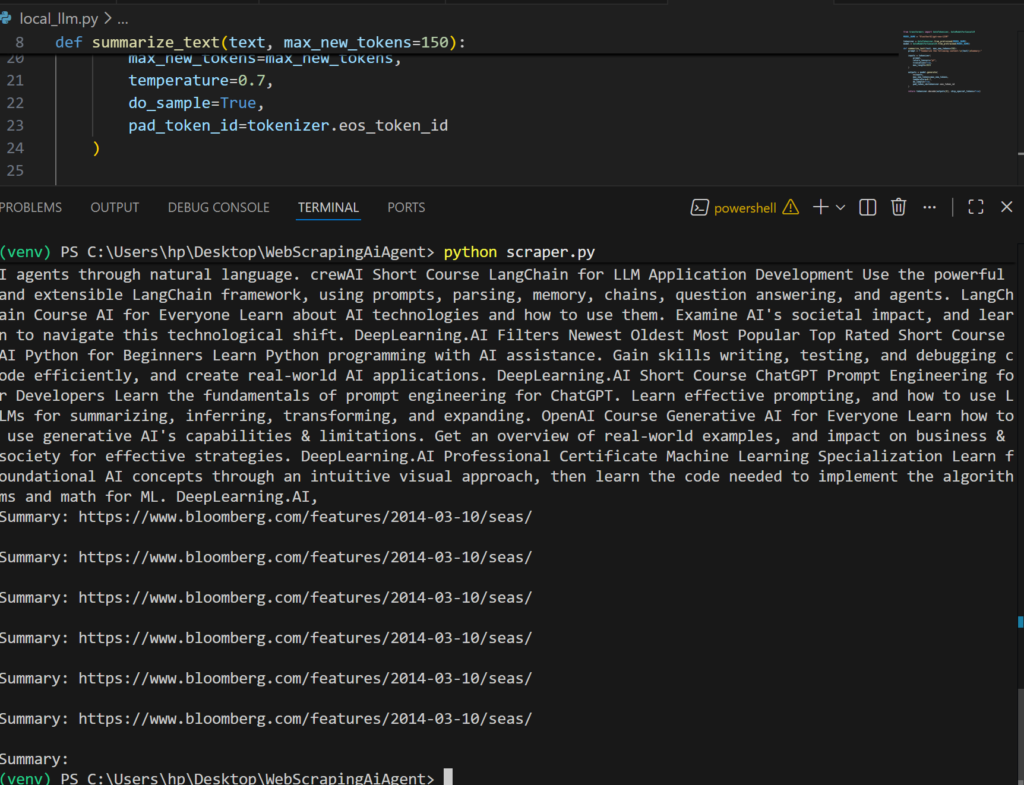
Output
Offline LLM vs Paid AI APIs (Comparison)
| Feature | Offline LLM | OpenAI / Gemini |
|---|---|---|
| Cost | Free | Paid |
| Internet Required | No (after download) | Yes |
| Accuracy | Moderate | High |
| Best For | Testing, learning | Production |
Conclusion: Build Smart Web Scrapers with AI
This project demonstrates how to build a modern AI-powered web scraper in Python using:
- Playwright for JavaScript rendering
- BeautifulSoup for parsing
- Offline LLMs for AI analysis
The architecture is future-proof, allowing you to switch to OpenAI or Gemini later without changing your scraper logic.
If you are learning Python web scraping, AI automation, or SEO data extraction, this approach represents industry best practices. Check Below Book